

A new business-grade desktop can cost more than many small offices, students and home users want to spend. A refurbished PC closes that gap. You get a computer built for daily office use by Dell, HP or Lenovo, at a fraction of the new price, and it is ready to work from the day it arrives.
This guide explains what a refurbished PC is, which type of desktop suits which kind of user, the specs worth checking and what to look for in the seller. It is written for buyers in South Africa, from a one-person home office to a business kitting out a whole team.
What is a refurbished PC?
A refurbished PC is a used computer that has been checked, cleaned and prepared for resale. Many come from companies that replace their computers on a fixed cycle, which means good-quality business machines come onto the market long before they are worn out.
Business desktops such as the Dell OptiPlex and Lenovo ThinkCentre ranges are designed to run all day in offices, to be serviced easily and to last. That build quality is the main reason a refurbished business PC is often a better buy than a cheap new consumer desktop at the same price.
Which type of refurbished PC suits you?
Desktops come in a few shapes. The right one depends on your desk, how you work and whether you already have a screen.
Micro PCs
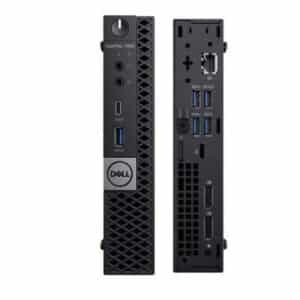
Micro PCs are small enough to sit behind a monitor or on a shelf. They are quiet, use little desk space and suit reception desks, point-of-sale counters and tidy home offices. The trade-off is limited room inside for upgrades, so choose the memory and storage you need from the start.
Small form factor (SFF) desktops
SFF desktops are the classic office computer: compact, but with more room for extra memory and storage than a micro PC. They suit most office work, accounts, admin and schoolwork. For example, the Dell 7070 Optiplex Desktop Intel Core i5-9th Gen 8GB Memory 256GB SSD has an SSD, several USB ports, DisplayPort and HDMI.
All-in-one PCs
An all-in-one puts the computer behind the screen, so there is one unit and one power cable. It is the neatest option for small spaces. Our all in one PC buying guide compares them with towers and laptops in detail.
Desktop bundles
If you are starting from scratch, a bundle saves you matching parts. Our desktop bundles combine a refurbished desktop with a monitor, keyboard and mouse, such as the Dell 7060/3060 Optiplex Desktop Intel Core i7-8th Gen 16GB Memory 256GB SSD & 500GB HDD + 22″ Monitor keyboard & Mouse.
Refurbished PC or refurbished laptop?
A laptop makes sense if you move between home, office and client sites, or want to keep working during load shedding on battery. A desktop makes more sense if you work at one desk most of the day. For the same money, a refurbished desktop generally gives you:
- a bigger screen, because you choose the monitor
- a full-size keyboard and mouse, which are better for long days
- easier upgrades of memory and storage
- no battery to wear out
Many people end up with both: a laptop for travel and a desktop at the main desk.
Specs to check before you buy
Processor (CPU) and generation
Look at the processor family and the generation together. A Core i5 handles office software, browsing, email, video calls and schoolwork comfortably. A Core i7 is worth it if you run many programs at once, work with large spreadsheets or do light design work. A newer generation is usually faster and more efficient than an older one in the same family, so a recent Core i5 can match or beat an older Core i7.
Memory (RAM)
8GB of RAM is a sensible minimum for everyday use. 16GB keeps things smooth if you keep many browser tabs open, run accounting software alongside email, or use video calls all day. On most desktops memory can be added later.
Storage: SSD vs hard drive
Choose a solid state drive (SSD) wherever possible. An SSD starts the computer and opens programs much faster than a traditional hard drive. 256GB suits most office users who keep files in the cloud; 512GB gives more room if you store photos or large files on the computer.
Ports, screens and networking
Check that the PC has the ports you need: enough USB ports for your devices, and video outputs (HDMI or DisplayPort) that match your monitor. Many business desktops are designed for a network cable, so if you need Wi-Fi, confirm it is built in or plan for a small USB Wi-Fi adapter.
Operating system
Every refurbished PC we sell comes with Windows 10 Pro installed, so it is ready for office software, email, browsing and video calls as soon as you plug it in.
What to look for in a refurbished PC seller
The machine is only half of the purchase. The seller matters just as much.
- A clear, written warranty. Our refurbished desktops come with a 12-month warranty included (T&Cs apply), which can be upgraded to 24 months.
- Full specs on the listing. The processor generation, memory, storage and operating system should be stated clearly, not left vague.
- Business-grade brands. Dell, HP and Lenovo business ranges are built for long service and are easy to support.
- Real people to talk to. You should be able to call or WhatsApp someone before you buy and after the sale.
- Delivery you can rely on. We offer free delivery nationwide.
Do not forget the screen
If you are buying a desktop on its own, you will need a monitor. A good second-hand monitor costs far less than a new one and is a simple way to stretch your budget further. Our second hand monitors buyer’s guide explains sizes, panel types and connections.
For an office, consider two monitors per desk. Most business desktops support more than one screen, and the extra space makes a big difference for spreadsheets and admin.
Which refurbished PC should you choose?
As a quick guide:
| If you need… | Consider |
|---|---|
| A tidy, quiet PC for reception or a small desk | A micro PC |
| An all-round office or home computer | A Core i5 SFF desktop with an SSD |
| Heavier multitasking or large spreadsheets | A Core i7 desktop with 16GB RAM |
| One unit with a built-in screen | An all-in-one PC |
| Everything in one purchase | A desktop bundle |
If the Dell range appeals, our Dell OptiPlex buying guide explains model numbers, sizes and generations. You can also browse every model in stock in our refurbished desktops range.
Buy your refurbished PC from Refurbs4U
Refurbs4U sells refurbished business desktops, laptops, all-in-ones and monitors from Dell, HP and Lenovo, from our base in Edenvale, Gauteng, with delivery across South Africa. Every PC comes with Windows 10 Pro and a 12-month warranty (T&Cs apply).
Not sure which model fits your budget? Contact Refurbs4U, or WhatsApp or call Howard on 082 452 2349, and we will help you choose.
Frequently asked questions about refurbished PCs
Is a refurbished PC worth buying?
For most office, home and school use, yes. A refurbished business PC from Dell, HP or Lenovo is built for daily office work and costs much less than a new one. Choose one with an SSD and a written warranty.
What is the difference between a refurbished PC and a second-hand PC?
A second-hand PC is sold as it is. A refurbished PC has been checked, cleaned and prepared for resale, and is usually sold with a warranty. Refurbs4U desktops include a 12-month warranty (T&Cs apply), upgradable to 24 months.
How much RAM does a refurbished PC need?
8GB is a sensible minimum for office work, browsing and video calls. Choose 16GB if you run many programs at once or work with large spreadsheets.
Which operating system comes with a Refurbs4U refurbished PC?
Every refurbished PC we sell comes with Windows 10 Pro installed, ready for office software, email, browsing and video calls.
Can I upgrade a refurbished desktop later?
Usually, yes. Most SFF and tower desktops let you add memory and storage later. Micro PCs and all-in-ones have less room inside, so choose the memory and storage you need from the start.