

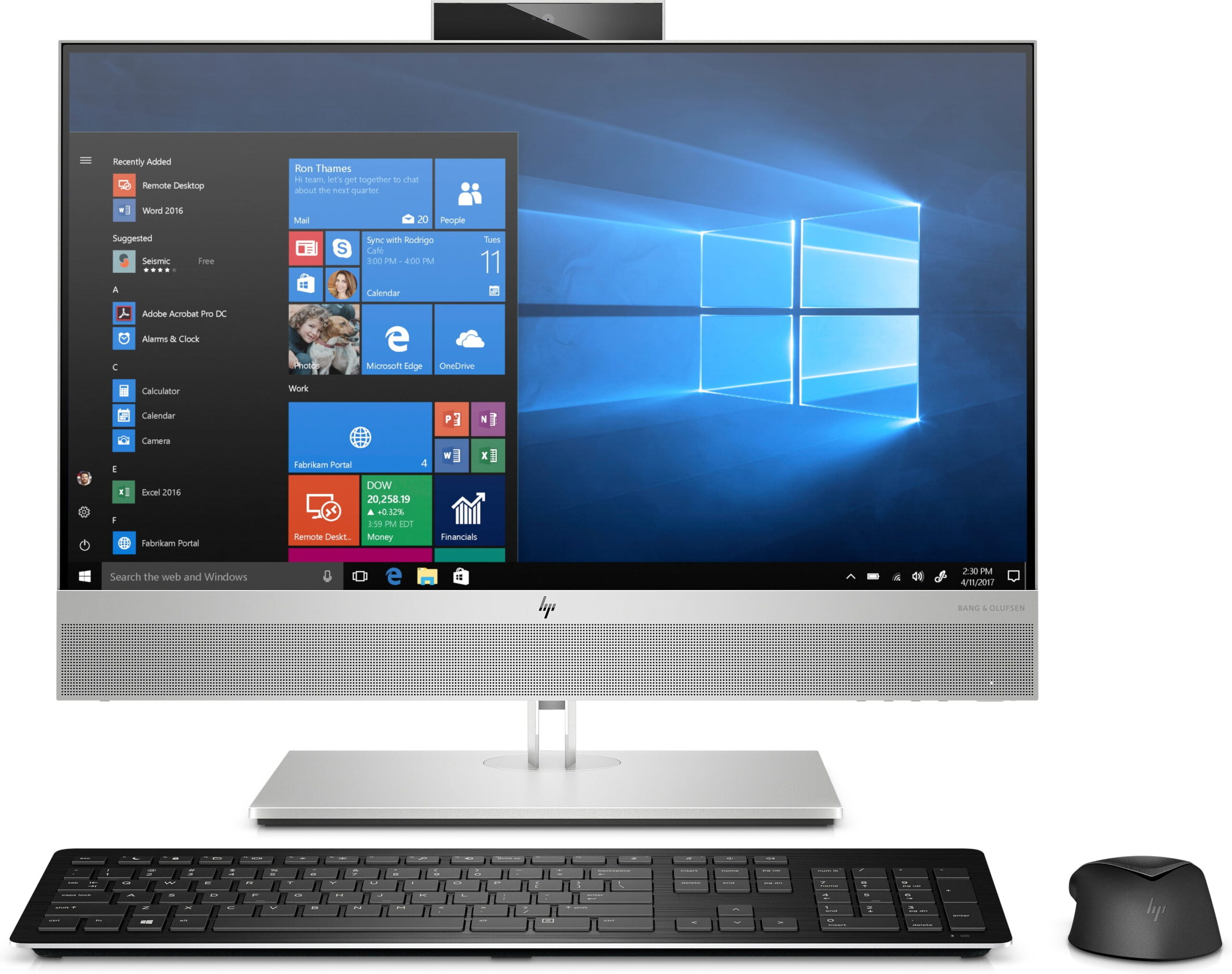
An all in one PC puts the screen, computer, speakers and often a webcam into a single unit, with one power cable. It is a neat answer for a reception desk, a home office in the corner of a lounge, or a family computer that should not look like a tangle of wires. Buying one refurbished brings the price of a business-grade model down to what you would pay for a basic new one.
This guide explains how an all-in-one compares with a tower desktop and a laptop, what to check in the specs, and how the four refurbished all-in-ones we have in stock compare. Prices are as listed on our website on 30 October 2026, including VAT.
What is an all in one PC?
An all-in-one (often shortened to AIO) is a desktop computer built into the back of the monitor. Instead of a separate tower under the desk, the processor, memory, storage and ports sit behind the screen. You add a keyboard and mouse, plug in one power cable, and you are ready to work.
All-in-one vs tower desktop vs laptop
Each format suits a different kind of user. Here is how they compare in practice:
- Desk space and cables: an all-in-one wins. One unit and one power cable, compared with a tower, a monitor and at least two power cables.
- Screen size: all-in-ones come with a proper desktop screen (21.5″ to 23.8″ in our current range). A laptop screen is usually 14″ or 15.6″ unless you add a monitor.
- Upgrades and repairs: a tower is easiest to open, upgrade and repair. All-in-ones usually allow memory and storage upgrades, but less else.
- Portability: a laptop wins if you need to work in different places. An all-in-one can be moved between desks, but it is not made to travel.
- Load shedding: a laptop has a battery. An all-in-one, like a tower, switches off when the power goes, so pair it with a small UPS if outages are a concern in your area.
If you would rather have a tower and choose your own screen, browse our refurbished desktops instead.
Who an all-in-one suits best
- Reception desks and front counters, where a tidy, professional look matters.
- Home offices and study corners, where space is tight.
- Small offices that want the same model on every desk, with simple setup.
- Family computers for homework, email, video calls and banking.
An all-in-one is a weaker choice for gaming or heavy video editing, because the graphics are built in and cannot be swapped for a separate graphics card.
What to check before you buy an all in one PC
Processor generation
All four of our current all-in-ones use Intel Core i5 processors, which handle office work, browsing, video calls and schoolwork comfortably. The generation matters as much as the i5 badge. Newer generations are faster and use less power, so compare the generation (for example 6th Gen vs 8th Gen) as well as the i5 badge.
Storage: SSD vs hard drive
A solid-state drive (SSD) makes a computer start up and open programs much faster than a traditional hard drive (HDD). A hard drive gives you more space for less money. If speed matters more than storage space, choose a model with an SSD, or ask for an SSD upgrade.
Screen size and resolution
Full HD (1920 × 1080) on a 23.8″ screen is sharp and comfortable for spreadsheets and side-by-side windows. A 21.5″ or 23″ HD screen is fine for email, browsing and basic office work.
Operating system
Every all-in-one in our current range is supplied with Windows 10 Pro, the business edition of Windows, so it is ready for office software, email, browsing and video calls as soon as you plug it in.
Ports and connectivity
Check for enough USB ports for your keyboard, mouse, printer and flash drives, a network (RJ-45) port for a reliable office connection, and Wi-Fi if you will not be using a cable. Some models also have a card reader or a display port for a second screen.
Our refurbished all-in-one PCs compared
These are the all-in-ones in our All-in-One PC range at the time of writing. Each one is supplied with Windows 10 Pro and comes with a 12-month warranty (T&Cs apply), upgradable to 24 months.
HP EliteOne 600 G2: best budget all-in-one
Intel Core i5 6th Gen, 8GB memory, 500GB hard drive and a 21.5″ HD screen, with built-in Wi-Fi and Bluetooth, supplied with Windows 10 Pro. R5,299 (was R6,495). You can add a 256GB SSD for R450 or a 512GB SSD for R750 for a noticeable speed boost.
Dell OptiPlex 9030 All-in-One: SSD on a budget
Intel Core i5 4th Gen, 8GB memory, 256GB SSD, a 23″ HD screen, six USB 3.0 ports, two USB 2.0 ports and HDMI in and out, supplied with Windows 10 Pro. R5,495 (was R5,995). The oldest processor in the range, but the SSD keeps it responsive for office basics.
Lenovo ThinkCentre M910z: most storage
Intel Core i5 7th Gen, 8GB memory, a 1TB hard drive, a 23.8″ Full HD screen and a 9-in-1 card reader, supplied with Windows 10 Pro. R6,495 (was R7,995). Read our full Lenovo ThinkCentre M910z review.
HP EliteOne 800 G4: newest processor
Intel Core i5 8th Gen, 8GB memory, 256GB SSD, a 23.8″ Full HD screen and USB-C, supplied with Windows 10 Pro. R8,995 (was R10,995). Listed as a demo unit. This is the pick if you want the newest processor and fastest model in the range. See our HP EliteOne 800 G4 review.
Why buy a refurbished all-in-one?
Business all-in-ones from Dell, HP and Lenovo are built for years of daily office use. When companies replace them on a fixed cycle, many still have plenty of life left. Buying refurbished gets you that business-grade build at a lower price, and keeps a working computer out of landfill. Every all-in-one we sell carries a 12-month warranty (T&Cs apply), with the option to extend it to 24 months.
Frequently asked questions about all in one PCs
Is an all in one PC better than a desktop tower?
It depends on how you use it. An all-in-one saves desk space and cables and is quick to set up. A tower is easier to upgrade and repair and lets you choose your own monitor.
Can you upgrade an all in one PC?
Usually you can upgrade the memory and storage, for example from a hard drive to an SSD. The processor and graphics are generally not upgradable, so choose the processor you need from the start.
Is a refurbished all in one PC reliable?
A business-grade all-in-one from Dell, HP or Lenovo is built for daily office use. Refurbs4U all-in-ones come with a 12-month warranty (T&Cs apply), upgradable to 24 months.
Will an all-in-one PC work during load shedding?
No. Like a tower desktop, an all-in-one has no battery and switches off when the power goes. A small UPS keeps it running long enough to save your work, or through a short outage.
Which operating system do your all-in-one PCs come with?
Every all-in-one PC in our current range is supplied with Windows 10 Pro, ready to use with office software, email, browsing and video calls.
Need help choosing?
Not sure which all-in-one suits your office or home? Contact Refurbs4U or call us on 082 452 2349, and we will help you choose the right model for your budget.